Using the board
The daily loop
Once the board exists, you drive it in plain language. Here's the rhythm — what to say, and which button does the same thing.
On this page
Everything you say below goes to a coding agent, which needs the skill in the repo —
akb skill install, or Configuration → General in the board app. Every ask is also a button
in the app and a command you can type (akb --help).
Two ways the work gets done
In the conversation you're in. Ask your coding agent for a board action — "refine #4", "#4 is done" — and it does the job right there. It already has your code in context, nothing extra is billed, and "not that one" is your next message when it takes a wrong turn.
Sent off as a run. Press a button on the board, or type akb card refine 4, and a second
agent starts on its own. It keeps working when you close the terminal, shows in the runs panel
with its own log, and can be stopped. Nothing you say reaches it while it goes.
Send work off when you want it happening while you do something else, or for long jobs — proposing across the repo. Otherwise just ask.
Pick what to work on
Say "What's next?" for up to three cards that are ready and unblocked, ranked by priority and ROI, each with one line on why. Nothing is written. When nothing qualifies it says what's in the way.
Planning judges every card against memory/project.md — what the project is and who it is for.
The board keeps it up to date; to steer direction, edit the Planner's decisions.md in
Memory, or give an agent a rule.
To think out loud instead — what a card means, whether two cards are the same — open a chat.
Add a task
Say "add a task: <idea>". The skill weighs the idea's value, feasibility and overlap with
existing cards, then writes one card in plain language with checkable todos.
Push a card forward
Say "refine #4". Planning settles what the code and sources can answer, calls in the specialists the card needs, and leaves only your calls as open questions.
- Nothing for you? The card is ready to build.
- Something for you? Answer the questions on the card page and the board applies your answers.
- Planning never builds. You start the build.
Say "resolve #4" to work through a card's open questions: the skill decides what the evidence settles and asks you the rest.
You rarely have to ask: a card you add, revise or resolve comes back refined on its own.
Build a card
Press Build on the card page, or say "build #4". An agent builds it, the board lands the work as one commit on the branch you are on, and archives the card. What you approve is the card, not the diff.
- Open questions: the card is built, then waits at landing until you answer — or press Skip on a question you don't want to answer.
- A pause: the card's title band says what it is waiting on and what answers it.
- Manual commit: untick Build this on a branch of its own and the agent builds in your folder; the card is archived once you commit it.
- Workflows that make files — Product video, Slide deck, Social post, Blog post, and your own with Use a Git worktree off — work in your project and commit nothing. Accept the result with Archive.
- No AI review: your own checks gate the landing. Suggest follow-up work catches what a build missed.
- Your own commits on that branch are refused while it lands. Commit on another branch, or
use
git commit --no-verify.
In a terminal it is akb card implement 4.
Queue a card that is waiting on another
A card blocked by another can still be built or refined — the board only warns. By default it
is refined once the last card in its way leaves the board; the card reads Scheduled, with
cancel. akb raw schedule 4 --action implement makes it build instead.
Review the board
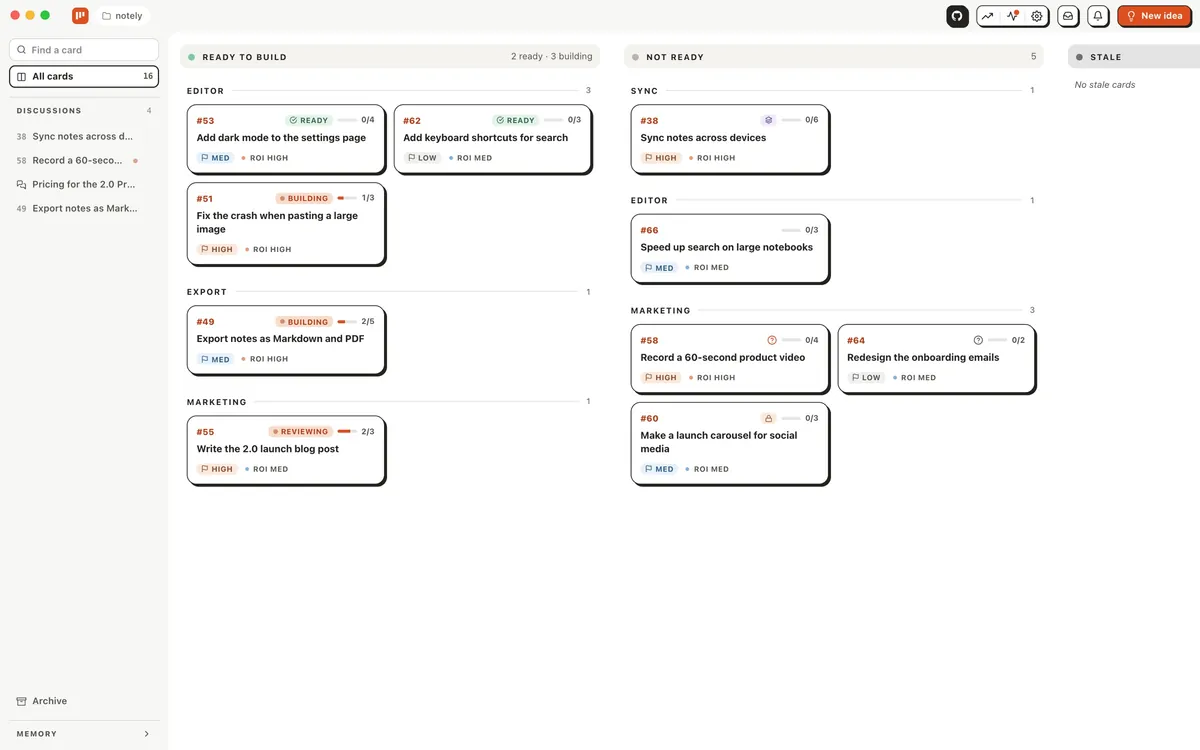
Say "review the board" (or "review #4"). The skill checks cards for plain language, split todos, duplication, and whether any are done or no longer worth it.
Finish a task
A card built by Build finishes itself once it has landed.
For work done another way, say "#4 is done". The skill updates the docs the change touched,
adds a line to readme.md, and archives the card. Archived cards stay readable in
docs/kanban/.archive/ for a while, then are deleted; on a Local board git keeps their history.
Test cases
Once cards finish, the QA manager, Coding's scheduled agent, writes and updates test cases: what your users actually do with the product, step by step, each step proved with a screenshot, GIF or log.
- Where they are:
docs/qa/<module>/<case>/case.md, indexed indocs/qa/README.md. Their screenshots, GIFs and logs stay on your computer, in.akb/qa/, and never enter git. - Read them on the board: Test cases, at the foot of the rail (under More on a phone). Send to Triage turns a feedback note into a triage item.
- What a run does: it updates the cases the latest finished cards affect, then covers one more module.
- A case that fails goes to Triage, naming the case and step.
- How often: set it on QA manager's page under Scheduled in Configuration → Workflows → Coding, or Disable it. See Run an agent on a schedule.
Reject an idea
Say "reject #4". The card moves to the archive marked Rejected, with your reason kept on
it word for word. A lasting reason also goes into rejected.md, so the idea isn't proposed
again.
To drop it without a reason or memory, press Remove on the card page and leave the reason empty — the button reads Discard.
Keep it lean
Ask the skill to prune the memory: it compresses readme.md, decisions.md,
rejected.md and redesign.md to short summaries grouped by topic.