
Working with Codex · 5 min read
How do you keep Codex work moving?
A task board with specialist workflows. Review what needs your judgment, then let Codex carry the work forward.
Tao Wu · Founder of AI4KanbanOn this page
Put your Codex work on a board. AI4Kanban organizes tasks and brings in specialist agents to prepare the parts that need your judgment before execution. You review the details that must be exact; Codex carries out the agreed work.
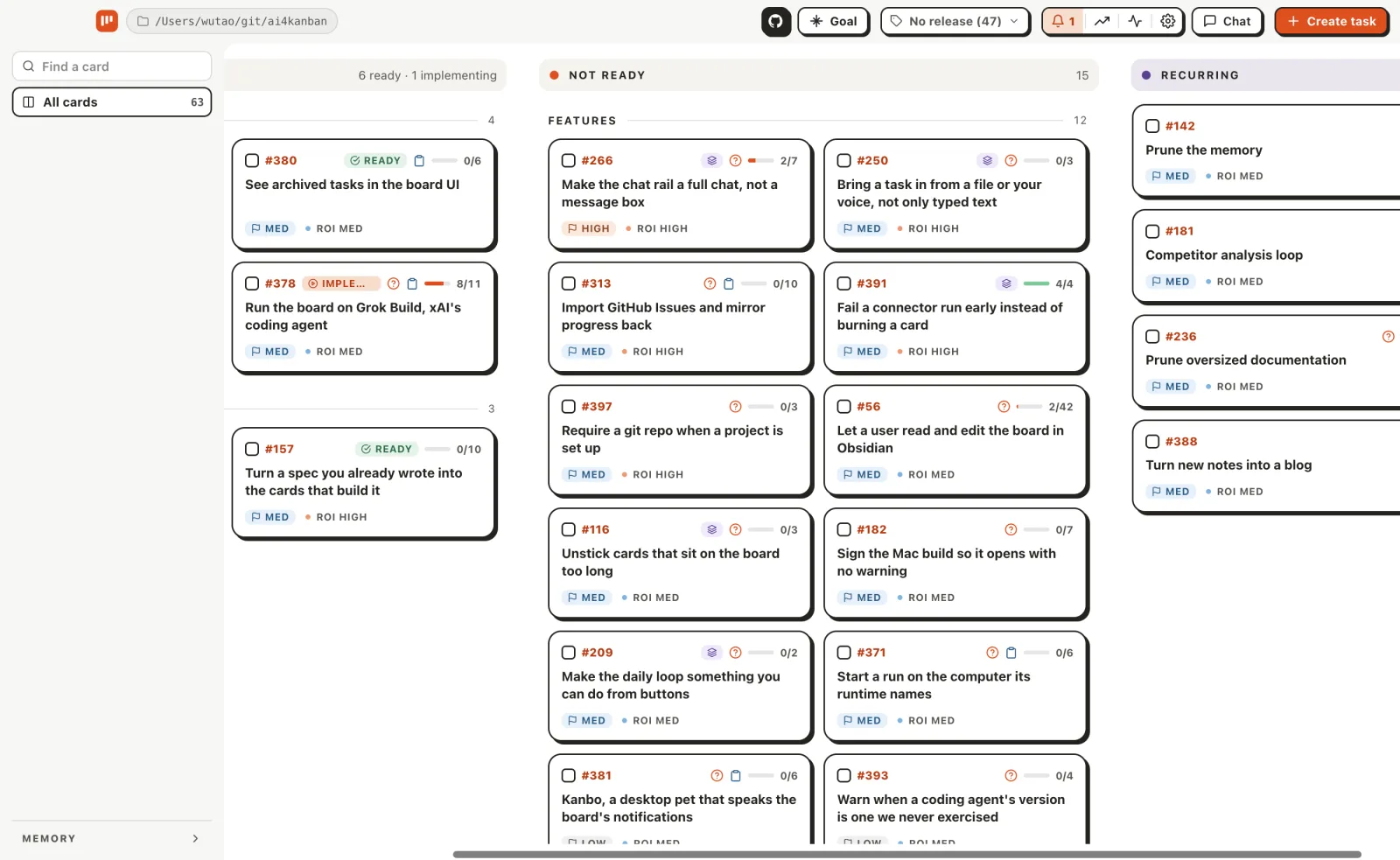
How does an idea become work Codex can carry out?
A task can span several conversations: planning, specialist drafts, implementation and later changes all belong to the same piece of work. One discussion can also produce several tasks. Each card keeps the outcome, requirements, drafts and progress together as those conversations move on.
Priorities help you choose what matters next. Dependencies keep blocked tasks waiting while independent ones move forward. Development and marketing tasks can use different workflows on the same board.
One specification
A coordinated task graph
What should I review before Codex starts?
Plan the work in stages so you can decide what is worth doing before the agents spend more tokens and time finishing it. Review a UI prototype, a prompt diff or the actual copy changes on the card, rather than imagining the result from a long written plan. Change what is wrong, or decide not to build it at all.
AI4Kanban brings in the relevant specialist agents to prepare those drafts. You judge the details that must be exact and supply the business context, real-world observations and user feedback behind your choices. Interface drafts can be previewed without running your project.
Codex follows the approved draft for the parts you reviewed; the agents handle the remaining details. Small fixes can go straight to implementation when there is nothing you need to review first.
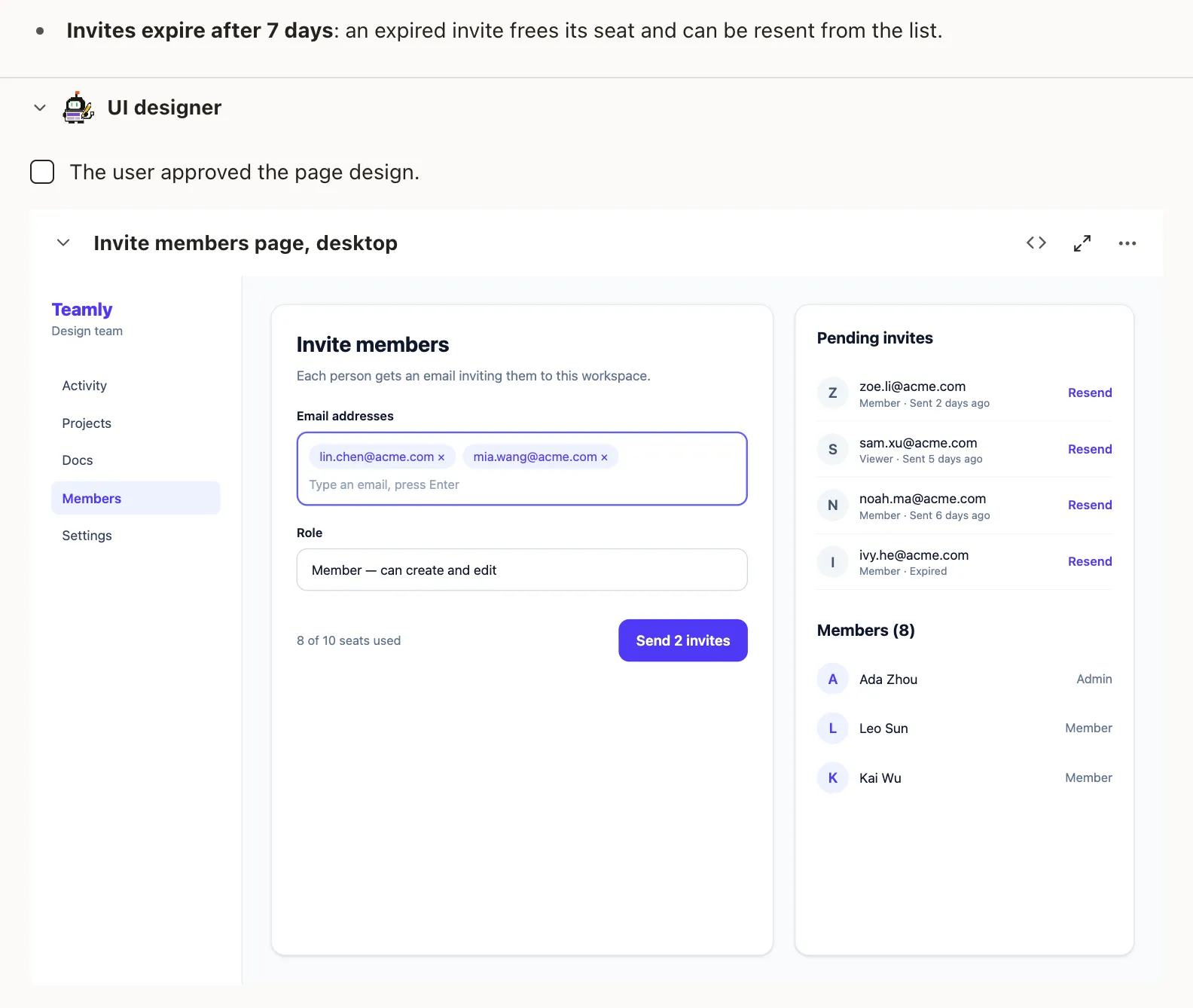
When a product decision remains unresolved, the card presents concrete choices and a recommendation. Agents research routine uncertainties themselves.
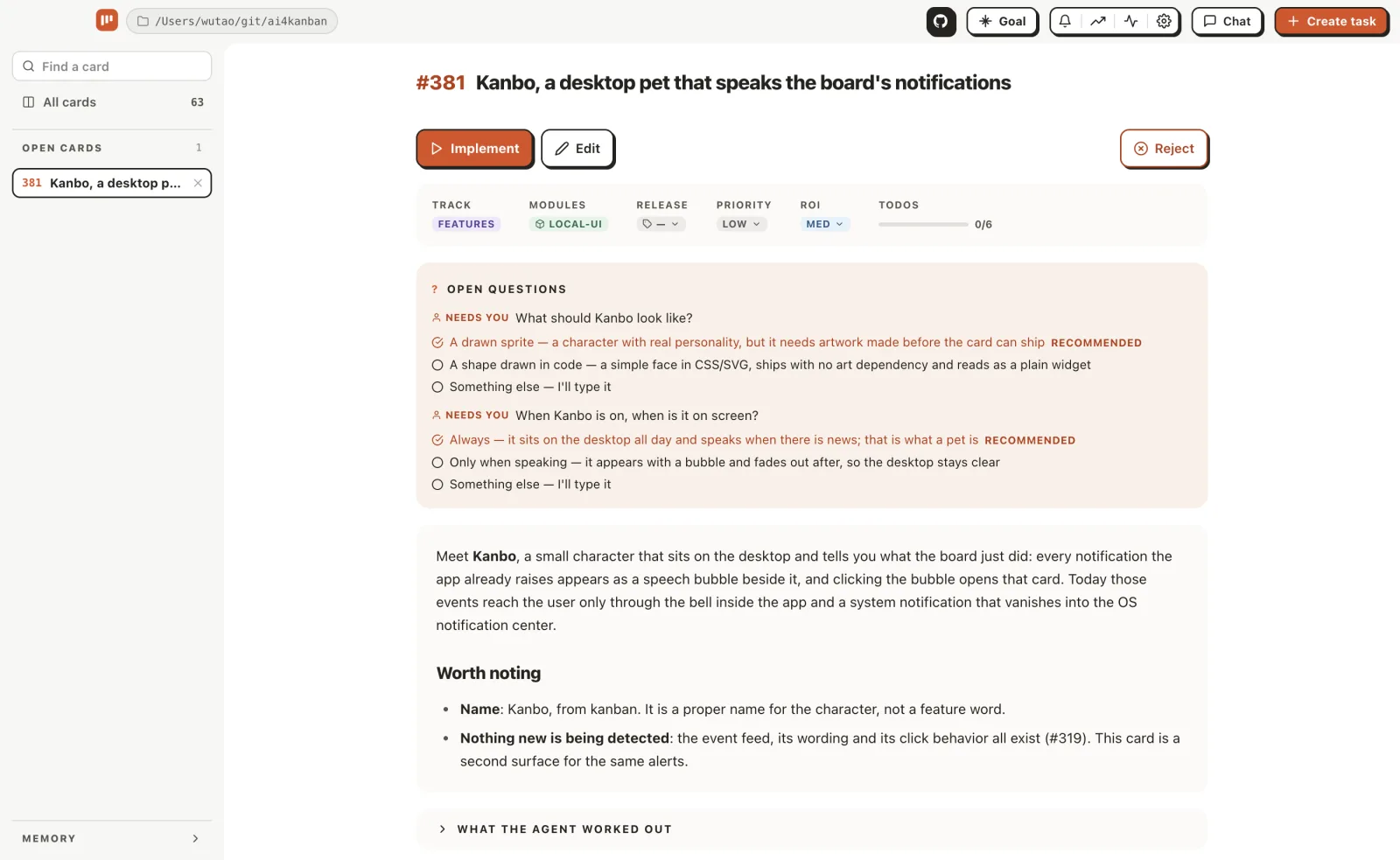
See draft review for the formats and approval steps.
Can the same board handle development and marketing?
Yes. A workflow defines what needs your attention and how to present it as a draft you can review. For a feature, that may be a UI prototype; for an article, an outline and the copy; for a video, a script and storyboard. Judge those parts before the agents finish the rest, so a wrong idea does not become a finished deliverable you have to redo.
| Workflow | What it produces |
|---|---|
| Coding | Software changes, with relevant interface, copy, prompt or email drafts |
| Blog post | An approved outline developed into an article with images and links |
| Product video | A script followed by a finished video and cover |
| Slide deck | A PowerPoint presentation with one image per slide |
| Social post | Post copy and captions for each platform, plus page images for a carousel |
| Video clone | A recreation of a reference video and a reusable template |
Specialist agents prepare each stage, with the instructions that role needs. Some tasks need more than one approval, such as copy before screen design. Development and marketing share the same board, and you can create your own agents and workflows.
All built-in and custom workflows are free. Slide elements in the image-based decks are not editable.Explore workflows and the specialist agents.
Can I use Codex alongside Claude Code?
Yes. Each agent can use its own runtime: the coding tool, model and settings that run its work. For example, use Codex for writing and Claude Code for implementation, or run the whole workflow on Codex.
The card keeps the requirements and approved drafts together as different agents take their turns. You choose the tools for each role in Configuration → Workflows.

See Multi-runtime support for supported tools and setup.
How does each agent remember my preferences?
Each specialist agent keeps and uses the preferences relevant to its role. The copy agent carries wording choices into later drafts; the design agent carries layout preferences into later prototypes. The role determines what should be remembered and what should be read for the next task.
Project memory supplies the shared product context, and global memory holds information several roles need. The files stay reviewable in your project, with scheduled review and pruning to keep them useful.
Settled answers to cards' open questions, grouped by topic.
- Guest checkout: an email is enough; no account before the first order.
- One page: address, shipping and payment stay on one screen.
- Currency: prices show in the buyer's own currency, fixed at order time.
Read about memory.
How does parallel Codex work reach my project?
With Automatic Git commits enabled, AI4Kanban runs independent tasks in parallel, each on its own branch and worktree. Tasks with unfinished dependencies wait.
Finished deliveries join a queue and land on the target branch one at a time as squash commits. AI4Kanban never pushes.
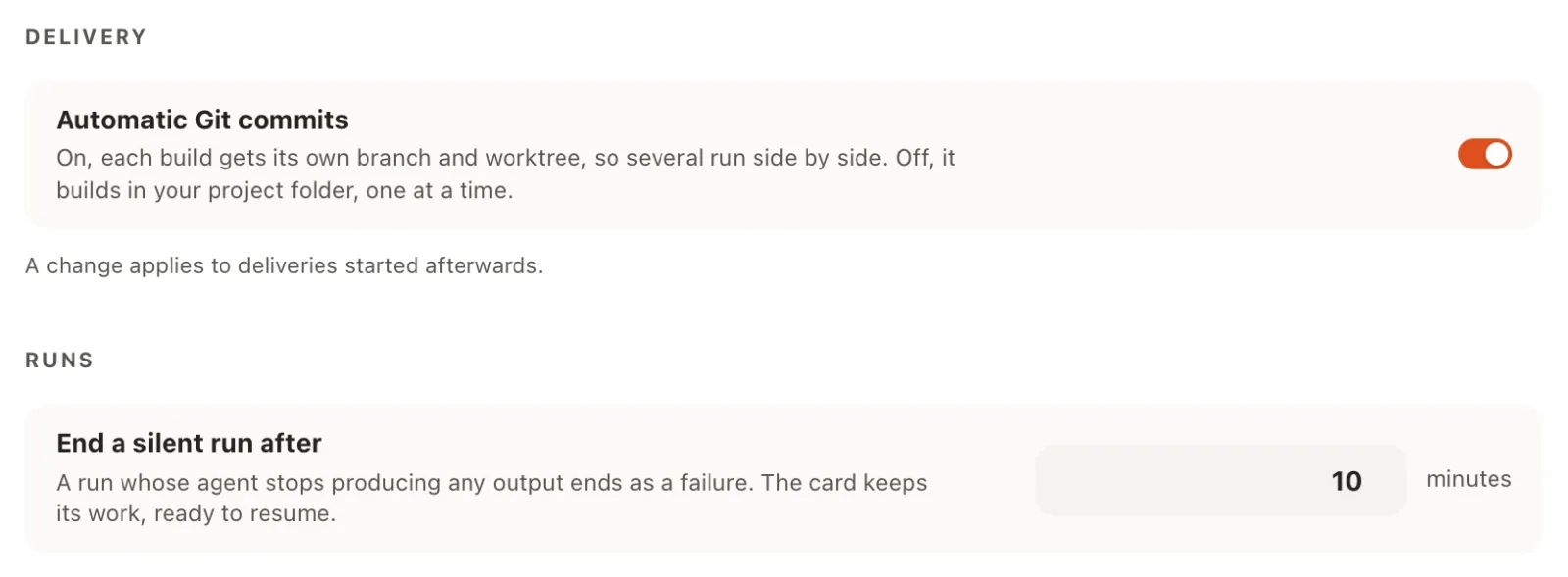
Questions and draft review requests appear in the app and can be sent to Slack. Other work can keep moving while one task waits for your input. You can inspect logs, stop a run and resume its saved Codex thread later.
Frequently asked questions
I use the Codex desktop app. Can I use AI4Kanban?
Yes. AI4Kanban runs Codex on your computer. It can find a standalone Codex CLI or the bundled engine in supported desktop installations on macOS and Windows. AI4Kanban has its own board and task conversations; it does not import or synchronize your desktop chats.
Can I keep my Codex setup?
Yes. Codex keeps using its login, applicable AGENTS.md instructions, skills and MCP configuration. Connect it in Configuration → Runtimes and test the connection before starting work.
How do workflows fit with my Codex skills?
Workflows define what needs human attention, when to review it and the draft you see. Skills provide the procedures and domain knowledge agents use to do the work. They complement each other.
AI4Kanban is organized around agents and does not manage your skills or plugins. Install the skills you need in Codex, such as a Blender skill, and Codex can use them while running board tasks.
Does it work with a ChatGPT subscription, or do I need an API key?
Both work. Use Codex's ChatGPT login, an OpenAI API key or a Responses API gateway.
Does every task wait for a draft?
No. Drafts are for the parts that need precise approval or your judgment. Small fixes can go straight to implementation. Some workflows have several draft stages.
Does approving a draft start implementation?
Approval updates the plan. Once required drafts and questions are settled, use Build to start implementation. Some content workflows produce their finished artifact during planning; use their draft stages, then archive the card when you are happy with the result.
Can I choose a different model for each agent?
Yes. Choose a runtime, model and reasoning effort for each agent. Leave the model fields empty to use that tool's defaults.
Can I set a token or cost limit before starting a run?
Not as a hard cap. AI4Kanban reports available token and cost data. Your provider, model and reasoning effort remain your spending controls.
Can Codex work in my current checkout?
Yes. Disable Automatic Git commits globally or for one delivery. Codex then works in your current checkout and you commit manually.
Will Codex commit, merge or push without my approval?
Starting a build authorizes automatic commits and one squash landing when automatic commits are enabled. Use manual commit mode to manage Git yourself. AI4Kanban never pushes.
What happens when Codex fails or reaches its usage limit?
The card keeps its delivery, worktree and saved Codex thread. Stop the run manually or let the silence timeout end it, then resume later.