
Workflow4 min read
Guardrails, specs and drafts: what each does for agent work
Guardrails set boundaries. Specs define the task. Drafts put the screens, copy and prompts that need your judgment in front of you before the agent builds.
Tao Wu · Founder of AI4KanbanOn this page
An agent can follow your rules and meet your requirements, yet still deliver a UI you’re not satisfied with. A draft gives you a chance to catch that before implementation.
What does a guardrail decide?
A guardrail is a rule the agent must follow while working on your project. For example: “Do not delete existing user data without my approval.” That rule applies across tasks, whether the agent is adding a page or fixing a bug.
CLAUDE.md and AGENTS.md are files where you can write rules for a coding agent to read. Here, we use guardrails to include these written rules as well as controls that enforce limits.
Writing “do not delete user data” does not itself prevent deletion. The agent can still ignore the instruction. Claude Code's documentation explains that rules in CLAUDE.md guide its behavior; blocking an action requires a separate control, such as a check that rejects the tool call.
What does a spec decide?
A spec describes what you want built and how it should behave.
Suppose you want a page where an admin can invite a teammate into your app. “Build an invitation page” leaves the agent to decide who can send invitations, what access the teammate gets and what happens if sending fails. A spec settles those choices:
- Only admins may invite a team member.
- The admin enters an email address, and the invitee joins as an editor.
- An address with a pending invitation cannot receive another one.
- If sending fails, show an error and let the admin retry.
This is a spec because it defines the feature the agent must deliver. You can check the finished feature against each requirement.
But every requirement could pass while the form is cluttered, the labels are confusing and the page looks awful. The spec above has not settled those choices.
You can specify those details too. A spec can include exact copy or a screen design. The useful question is which choices you want to judge before implementation, and how to present them for that review.
What does a draft let you decide?
A draft makes the part needing your judgment concrete. The agent produces a proposed screen, actual copy or full prompt during planning, so you can review it before the feature is built around it.
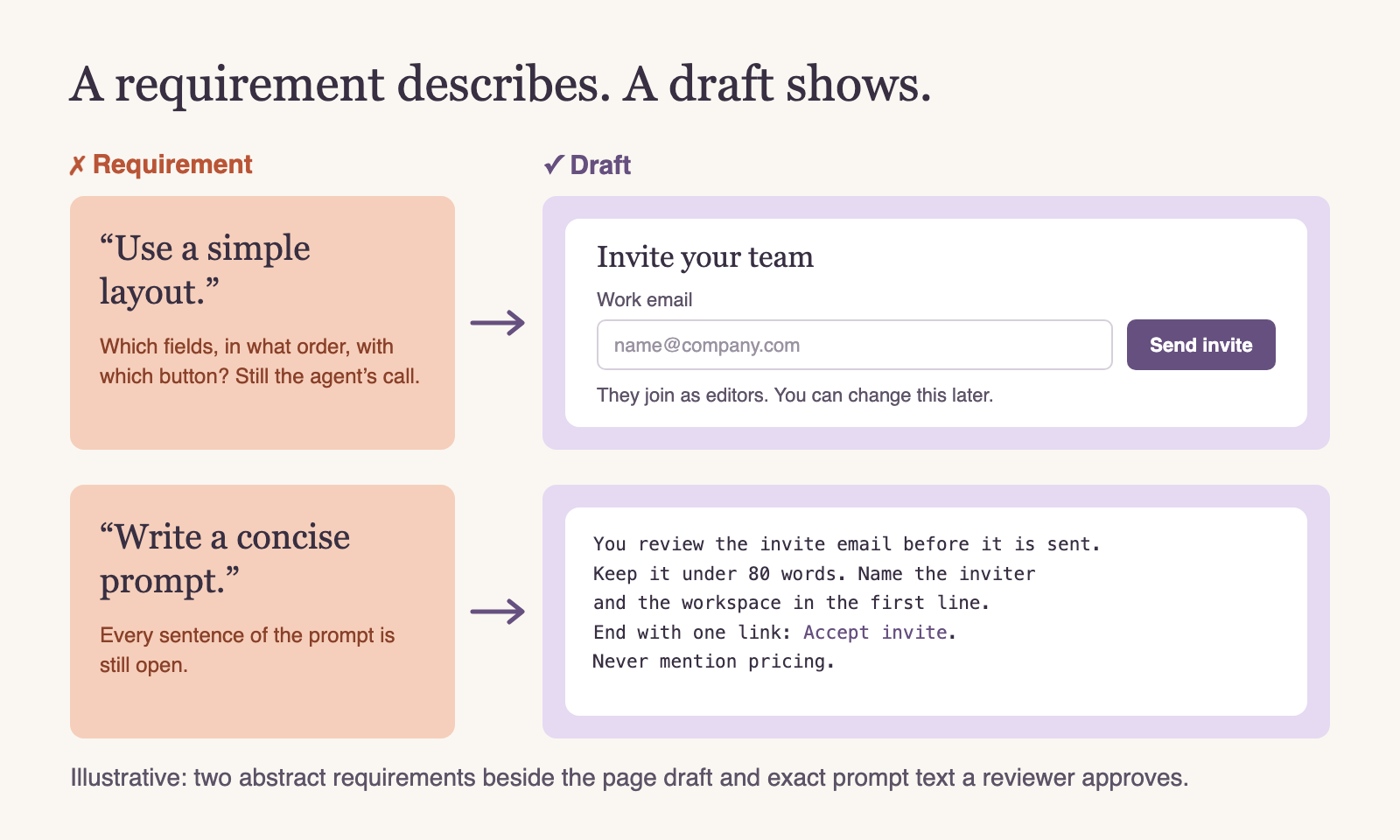
This illustration shows an invitation form and a prompt for writing its email. “Simple layout” has become a particular arrangement of fields and a button. “Concise prompt” has become sentences you can read and edit.
Now you can judge the choices directly. Is the editor role obvious? Does the form explain what happens next? Does the prompt ask for the right tone and include the information the recipient needs?
In AI4Kanban, this is what a draft is for: the relevant planning agent puts the design, copy or prompt on the card for review. You can ask for changes before handing the task over for implementation.
Isn't a plan already a draft?
A plan describes how the agent intends to do the work. A draft shows the part you want to judge.
“Add an invitation form, validate the address and send an email” is a plan. It tells you the steps. It does not show the form or the email-generation prompt.
The rendered form and the exact prompt text are drafts. You can review the layout and wording themselves.
A plan can contain drafts. The distinction is what it lets you evaluate, rather than whether the file is called plan.md or displayed in a planning mode.
Can a draft be part of a spec?
Yes. Once approved, the screen or prompt can become part of the specification. It records the concrete version the agent should implement or reuse.
The rest of the spec still matters. A screen may show that invitees join as editors, but it cannot prove that only admins can send invitations. A prompt can specify the email's wording without defining how a failed send should behave.
Approval settles the choices shown in the draft. Implementation still needs checks for the required behavior, permissions and failure cases.
How do they work together?
For the invitation feature, each contributes something different:
| What you give the agent | What that settles | |
|---|---|---|
| Guardrail | “Do not delete existing user data without my approval.” | A rule it must follow while doing the work. |
| Spec | “Only admins can invite teammates. Invitees join as editors.” | What the feature must do. |
| Draft | The actual form design and full email prompt, ready for your review. | The layout and wording you want implemented. |
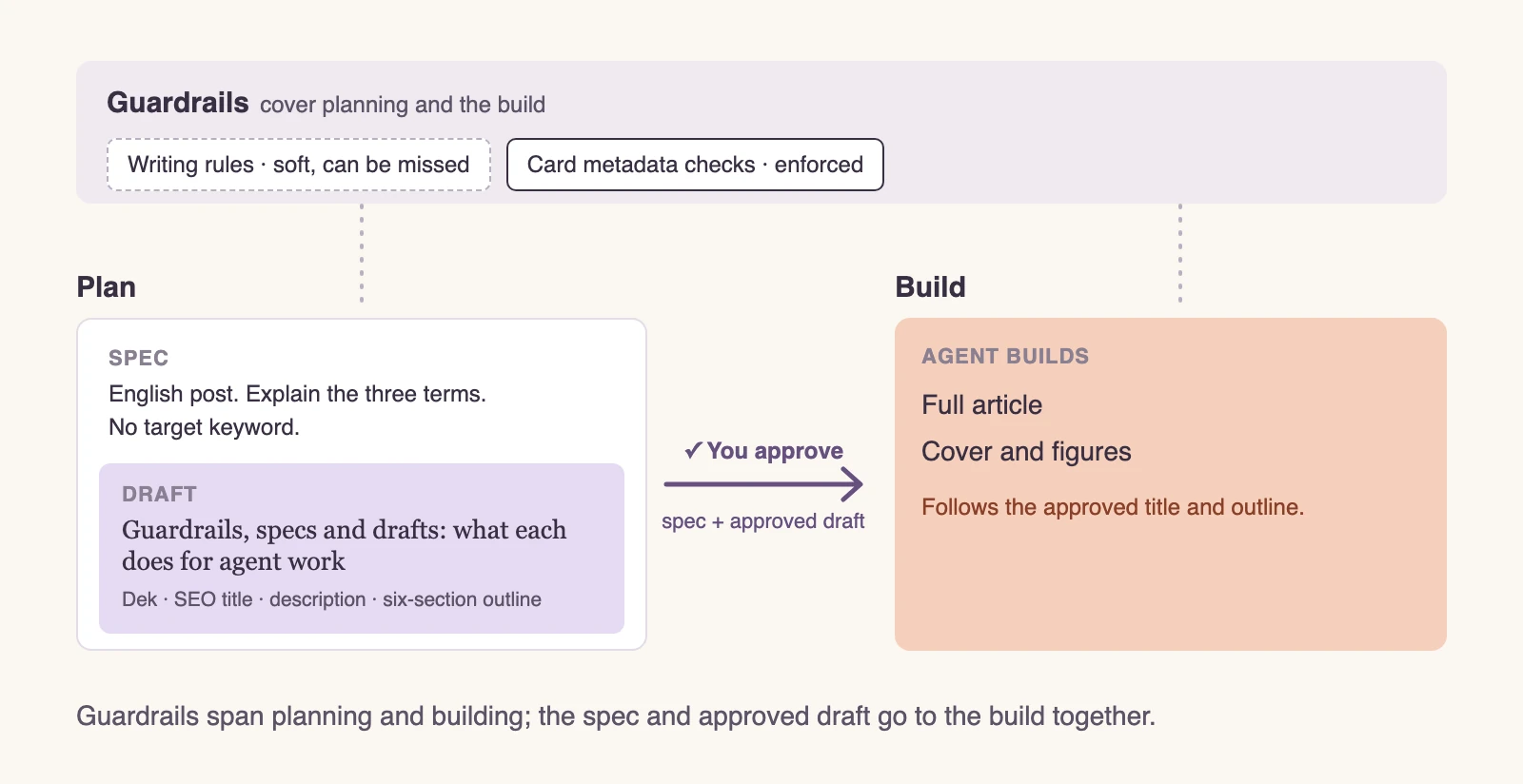
The agent builds from the requirements and approved drafts while continuing to follow the guardrails. You leave component structure and other implementation choices to it unless those need your review too. The finished feature is checked against both the required behavior and the screen and wording you approved.